Report Meter Readings Online?


Tinny, the new virtual assistant at Towngas, offers instant support on general enquiries about Towngas’ residential services.
You may find Tinny at Towngas.com, Towngas APP or WeChat.
Step 1: On the Towngas.com homepage, click on "Virtual Assistant”.
.png)
Step 2: Read the Important Notice carefully and click "Confirm".
.png)
Step 3: Enter your question in the text box or click on the "Main Menu" button to select the relevant service category. Tinny will respond to your enquiry immediately.
.png)
| Category | Sample Questions |
|---|---|
Account Management | How do I open a Towngas account? |
Gas Bills | How do I pay my gas bill? |
eBilling | How do I register for eBilling? |
Installation | How much is a site survey? |
Maintenance Service | I’d like to book a maintenance appointment |
Product Information | What kinds of gas appliances can I choose from? |
Customer Service Centre, Cooking Centre and Towngas Avenue | Where is Towngas Avenue? |
Q: Can I apply for a new account, schedule for maintenance or check my gas bill through Tinny?
A: Tinny cannot process account applications or appointment bookings directly, but she can offer information on how to go about doing so.

To protect your personal data, account-related enquiries cannot be processed through Tinny. Please do not disclose any personal information in your exchange with Tinny.
Q: What should I do if I have a question that Tinny cannot answer?
A: Click <here> to leave a message and our customer service team will get back to you soon. Or, chat with our customer service officer directly via Tinny.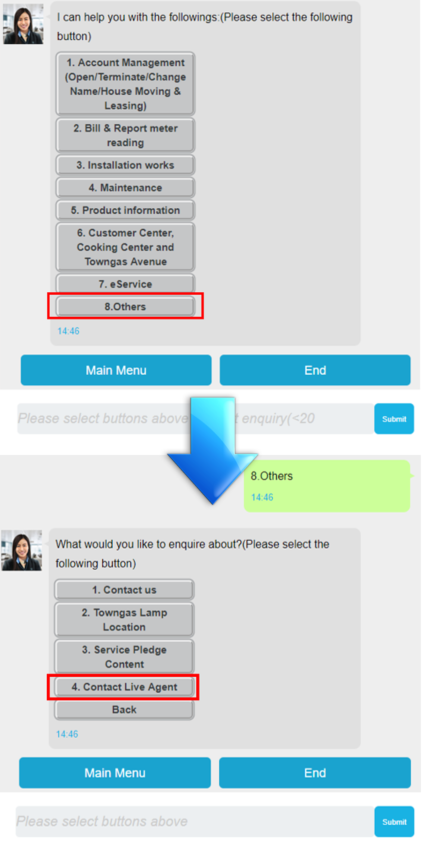
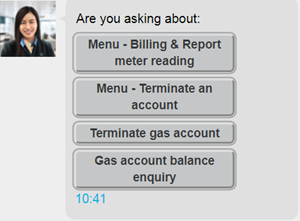
Q: Tinny provided me with more than one option. What should I do?
A: Tinny provides a list of options when she is not sure about your question. Select your preferred option to continue.